The best solar software stack in 2026 pairs one specialist design tool with one operations platform that owns execution end to end. We rank Scoop first at the operations layer because it runs new installs, service calls and recurring O&M work from the same system and connects to the design, CRM and accounting tools you already use, rather than asking you to replace them.
Aurora Solar leads design and residential proposals, OpenSolar leads free proposals, PVsyst leads bankable simulation, and HubSpot leads CRM for teams under fifty seats. The stack fails at the seams between those tools, not inside them, which is why we rank every layer on how cleanly it hands off.
Key Takeaways
- A solar software stack has seven layers: design and simulation, proposal and sales, CRM and pipeline, project and field operations, O&M and asset performance, customer experience, accounting, and an integrations layer. Most installers buy four of them properly and improvise the other three.
- We priced 27 tools from vendor-published pricing pages on 1 September 2026. A ten-person residential installer on the premium path pays about $13,260 a year for six of the seven layers; the same six layers assembled from free and entry tiers cost about $1,884. That is a seven-times spread on identical coverage.
- The operations layer is where stacks break, because it is the only layer that has to receive data from every other one. Scoop connects to the tools you already run rather than replacing them: Aurora Solar, OpenSolar, HelioScope, Solargraf, Solo and Bodhi all have live integrations, alongside Salesforce, HubSpot, QuickBooks, DocuSign and Zapier, with 500+ integrations reachable through Scoop’s GLOO.
- Design is not a layer to consolidate. Aurora Solar, HelioScope and PVsyst exist because shading analysis, stamped plan sets and bankable yield reports are specialist engineering work. Keep the design tool you trust and connect it to everything downstream.
- The installed base is now the revenue. SEIA recorded the 6 millionth US solar installation in 2026, and Lawrence Berkeley National Laboratory tracks roughly 4.9 million distributed systems through 2024. Every one of them becomes recurring service work, so O&M is a first-class layer, not a footnote.
What Is a Solar Software Stack?
A software stack is a collection of technology or programs that work together to execute particular tasks and business processes. A solar software stack refers to specific solar software tools that can be combined to empower a commercial or residential solar, EV charging, battery storage, or other renewable business.
A successful solar software stack, on the other hand, is built using best-of-breed software tools that are integrated and work together to streamline processes, workflows, project updates, data upkeep, document management, and more.
In practice that means seven layers. A lead arrives, a designer models the roof, a proposal goes out, a contract is signed, a project is created, crews are dispatched, the install is inspected and closed out, the customer is kept informed, the invoice is raised, and then the system enters twenty-five years of service. Seven different categories of software touch that sequence, and the data has to survive every one of the handoffs between them.
Best of Breed Solar Software, or One All-In-One Platform?
In the search for software, many businesses are sold on the idea of an “all in one” platform, one platform that does it all, from sales and marketing to project management, customer service, accounting, and more. One software tool, one implementation, and one subscription fee. Although this approach seems convenient, these platforms are often a myth. Eventually, each must decide where to focus their functionality and pieces that are important to your business may get left behind.
This is why understanding how to build a best-of-breed software stack is crucial. Rather than passable performance of a variety of functions, best-of-breed software is focused on strong and specialized execution of a few key functions.
Our position after building operations software for solar teams since 2016 is that the argument is framed wrongly. The real question is not how many vendors you buy from, it is how many systems of record you keep. Best of breed tools are valuable at the specialist layers, where design accuracy and bankable yield reports are worth paying a specialist for.
Consolidation tools are used at the operations layer, because a project cannot have two owners. Teams that get this backwards end up with one mediocre tool doing design badly and three tools all claiming to hold the project schedule.
The Handoff Test: How We Ranked Every Layer
We score tools on how well they receive work from the layer above and pass it to the layer below, because that is where solar operations actually leak. Five criteria, applied identically at every layer, and we use them on our own product too.
- Field execution. Can the tool put the right work order, checklist and plan set in a technician’s hand offline, and can it enforce that installs and maintenance calls follow the correct procedure, so you cut rework and repeat truck rolls?
- Workflow automation and handoffs. When a stage completes, does the next stage start on its own, with the documents and photos attached, or does somebody have to remember to move it?
- Integration depth. Does the tool write back as well as read, at the field level, or does the “integration” turn out to be a CSV export and a weekly upload?
- Reporting and audit readiness. Can you produce, on demand, the full asset history and the evidence that an SLA was met, in a form a commercial client or an asset owner will accept?
- Customer success and implementation support. Most vendors gate hands-on help behind enterprise contracts. Buyers discover this after signing, which is why we score it. Scoop gives every account a dedicated success manager plus a fractional team that helps build and maintain the workflows.
Criteria We Did Not Include
There are two things a stack roundup is expected to score, that we deliberately left out, and the reasoning for each.
- Design capability. Companies that treat design precision as a competitive differentiator should keep a purpose-built design tool and connect it, not expect an operations platform to replace it. Aurora Solar, HelioScope and Solargraf earn their place for exactly that reason, and we compare them properly in our solar design software roundup. Scoring an operations platform on shading analysis would tell you nothing useful.
- Lead generation and marketing features. Door-knocking apps, canvassing territories and marketing automation belong to a different buying decision with a different budget owner. Including them would reward tools for breadth we do not think you should buy on.
Solar Software Stack Comparison: 27 Tools, Priced
Every price below was taken from the vendor’s own published pricing page and verified on 1 September 2026. Where a vendor does not publish pricing we say so plainly rather than quoting a third-party estimate, because aggregator figures for this category are frequently wrong.
Prices marked “annual” assume the annual commitment discount.
| Tool | 2026 published price | Best for | Key capability | Limitation |
|---|---|---|---|---|
| Scoop | Unlimited users, storage and devices on every plan | Installers, EPCs and O&M providers running repeatable field work at volume | Offline field execution, automated stage handoffs, SLA-ready audit trails, 500+ integrations via GLOO | Does not design PV systems or produce stamped plan sets |
| Aurora Solar | $135/user/mo annual (Basic), $220/user/mo annual (Premium), Enterprise custom | Residential design and sales proposals | LiDAR-grade 3D modeling, shading analysis, one-call close proposals | Basic and Premium cap at 1 user and 50 projects per month |
| HelioScope | $1,620/license/yr (Basic), $2,640/license/yr (Pro) | Commercial and industrial layouts | C&I array design with integrated storage modeling added June 2026 | 10 projects per license per month on Basic and Pro |
| PVsyst | CHF 700/yr Professional; CHF 3,000/yr PVsystCLI | Bankable P50 and P90 yield studies | The simulation lenders and independent engineers expect | Desktop engineering tool, not a sales or ops tool |
| OpenSolar | Core platform free. Accounting connectors $49/mo. API access is a per-project fee | Lean residential teams and anyone starting out | Full design and proposal suite at no license cost | API access and accounting connectors became paid on 16 April 2026 |
| Solargraf | $2,799/yr (Starter) to $12,999/yr (Enterprise); overage $9 to $11 per extra project | Residential teams that want design and TPO financing in one place | Express Editor plus direct TPO partner integrations | Priced by project and user caps, so overage is easy to trigger |
| RatedPower | Not publicly listed. Basic, Advanced and Enterprise tiers named | Utility-scale developers | Automated plant layout, substation design, CAPEX and LCOE | Utility-scale only, no residential or C&I workflow |
| Solo | Not publicly listed. No tier names published | Residential sales teams that sell in the home | Fast proposal and document turnaround | Nothing about the commercial model is public |
| Pylon | $4 per project (Standard), $10 per project (Pro) | Teams with spiky project volume | Per-project pricing with unlimited users | Solar CRM is a paid add-on from $49/user/mo |
| HubSpot Sales Hub | Free (2 users); $7/seat/mo Starter annual; $90 Professional; $150 Enterprise, plus one-time onboarding | Sales teams under fifty seats | The cleanest pipeline reporting in this list | Professional carries a $1,500 one-time onboarding fee |
| Salesforce Sales Cloud | $25 Starter; $100 Pro Suite; $175 Enterprise; $350 Unlimited, per user per month | Multi-state operations with a Salesforce admin | Configurable to almost any process | List prices rose about 6% on 1 August 2025 and configuration is a project |
| Zoho CRM | Free (3 users); $14 Standard; $23 Professional; $40 Enterprise, per user per month annual | Budget-conscious teams that still want a real CRM | The lowest credible cost per seat in this table | Solar-specific workflows have to be built by you |
| SalesRabbit | $49/user/mo annual (Pro); $59/user/mo (Team); RoofLink Pro $120 | Door-to-door and canvassing sales | Territory management and field sales tracking | Sales layer only, stops at the signed contract |
| Enerflo | Not publicly listed. Flat monthly rate by install volume, plus a one-time implementation fee | Residential sales orgs with dealer networks | Not charged per seat, design, proposal or job | 12-month minimum contract |
| Sunbase | From $59/user/mo, configured rather than tiered | Small residential installers wanting one tool | CRM and basic project tracking in one place | Final price depends on modules, so quotes vary widely |
| ServiceTitan | Not publicly listed. Starter, Essentials and The Works tiers named, priced per technician | High-volume residential service trades | Deep dispatch and call-booking machinery | Built around trades service calls, not solar project delivery |
| Jobber | $29/mo Core annual to $399/mo Plus annual; extra users $29/mo | Teams of two to fifteen doing service work | The fastest scheduling setup in this table | Bundled user counts make growth steps expensive |
| Housecall Pro | $59/mo Basic annual (1 user); $149 Essentials (5); $299 Max (8) | Small residential service businesses | Strong consumer-facing booking and payments | Additional users cost $75 to $100 per month |
| Monday.com | Free (2 seats); $9 Basic; $12 Standard; $19 Pro, per seat per month | Under roughly ten projects a month | Flexible boards you can shape in an afternoon | No offline field app and no solar-specific execution logic |
| Procore | Not publicly listed. Annual contract, unlimited users | Large construction-led EPCs | Construction-grade document and RFI control | Priced for construction volume, heavy for residential |
| Bodhi | Free up to 5 new projects/mo and 60 total. Starter and Pro sold in project packages, prices not listed | Homeowner communication on residential jobs | Automated customer updates from install through monitoring | Customer experience only, does not run the work |
| SolarEdge Monitoring | Prepaid 5-year plan with hardware, then $44.99/yr residential, $99.99/yr small commercial, $249.99/yr commercial | Fleets standardized on SolarEdge inverters | Module-level performance data at no extra cost for five years | Single-vendor, so mixed fleets need a second portal |
| Enphase Enlighten | Free app tier. Enlighten Manager upgrade sold monthly or lifetime, price not published | Fleets standardized on Enphase microinverters | Per-panel energy data free to the homeowner | Single-vendor, and the paid tier price is not public |
| AlsoEnergy PowerTrack | Not publicly listed | Utility-scale and large C&I asset owners | Enterprise asset performance management | No published pricing and enterprise-only onboarding |
| QuickBooks Online | $38/mo Simple Start; $85 Essentials; $140 Plus; $340 Advanced | Almost every installer under 100 people | The accounting system your bookkeeper already knows | Seat counts are bundled per plan, not per user |
| DocuSign | $11/mo Personal; $30/user/mo Standard; $45/user/mo Business Pro, billed annually | Contract and change-order signature | Envelope audit trail that holds up in a dispute | 100 envelopes per user per year on Standard and Business Pro |
| Zapier | Free (100 tasks/mo); Professional from $19.99/mo; Team from $69/mo | Filling gaps between tools with no native link | Fast to build, no developer needed | Task-based pricing gets expensive at real volume |
Pricing last verified 1 September 2026 from each vendor’s own published pricing page. Six of the 27 publish no pricing at all. Third-party figures circulate widely for RatedPower, Solo, Enerflo, ServiceTitan, Procore and AlsoEnergy; all were rejected because none are vendor-published.
Book a Demo and Bring One of Your Own Projects
You do not need a slide deck to work out whether the operations layer of your stack is holding. Bring one real project to a call with the Scoop team, and we will walk the whole sequence with you: design handoff, contract, dispatch, install, closeout, invoice, first service call.
Layer 1. Solar Design and Simulation Software
The design layer produces the array layout, the shading analysis and the energy yield that every downstream tool depends on, and it is the one layer we tell teams not to consolidate. Get this wrong and the proposal is wrong, the bill of materials is wrong, and the crew arrives with the wrong racking.
- Aurora Solar leads residential. Basic is $135 per user per month on the annual plan and Premium is $220, each including one user and fifty projects a month. The 3D modeling and shading analysis are the reason it is the most-used design tool in US residential solar.
- HelioScope leads commercial and industrial, at $1,620 per license per year on Basic and $2,640 on Pro. Aurora Solar added integrated storage modeling to HelioScope in June 2026, so C&I design, storage sizing and financial analysis now sit in one tool.
- PVsyst leads bankable simulation at CHF 700 per year for the Professional license. If a lender or an independent engineer is going to read your yield study, this is the tool they expect to see behind it.
- OpenSolar is the strongest free option, and the core platform is genuinely free. Note that OpenSolar began charging on 16 April 2026 for API access, on a per-project basis, and for its Xero and QuickBooks Online accounting connectors at $49 a month. Most articles still describe OpenSolar as entirely free, which is now out of date.
- Solargraf runs $2,799 to $12,999 a year by project and user caps, and added direct TPO partner integrations in September 2025. RatedPower is the utility-scale pick and publishes no pricing.
Layer 2. Solar Proposal and Sales Presentation Software
The proposal layer turns a design into a signed contract, and its real job in the stack is to hand a complete, structured customer record forward. Most proposal tools are sold on how the document looks. Buy on what happens after the signature.
- OpenSolar is the default for lean residential teams, because the proposal engine costs nothing and the design tool comes with it.
- Solo is built for selling in the home and publishes no pricing at all, not even tier names. Pylon prices per project instead of per seat, at $4 on Standard and $10 on Pro, with unlimited team users, which suits teams whose volume swings by season.
- Solargraf and Enerflo both fold financing into the proposal, which matters if you sell PPA or lease products, because the financing partner’s approval status has to travel with the project.
The failure mode here is well known and expensive: the proposal tool holds the customer record, the operations tool holds the project, and nobody can say which one is right. Fix it by making one system the owner and letting the other write into it.
We wrote up the mechanics in eliminating double data entry between CRM and field service tools.
Layer 3. Solar CRM and Pipeline Software
The CRM layer owns everything before the contract and nothing after it. That boundary is the single most useful decision you will make about your stack, and the teams that blur it are the teams whose sales reps end up scheduling installs.
- HubSpot Sales Hub is our pick under fifty seats. Free for two users, $7 per seat per month on Starter annual, $90 on Professional and $150 on Enterprise. Budget for the $1,500 one-time onboarding fee on Professional, which is easy to miss.
- Salesforce Sales Cloud runs $25 on Starter Suite up to $350 on Unlimited per user per month. Salesforce raised list prices on Enterprise and Unlimited editions by about 6% on 1 August 2025. It is the right answer when you already employ someone to administer it.
- Zoho CRM is the value pick at $14 per user per month on Standard annual, free for three users. SalesRabbit at $49 per user per month annually owns door-to-door canvassing, and acquired Roofle in January 2026.
- Enerflo charges a flat monthly rate based on your install volume rather than per seat, per design, per proposal or per job, with a one-time implementation fee and a twelve-month minimum.
Layer 4. Solar Project and Field Operations Software
The operations layer is where a signed contract becomes a completed install, and it is the only layer that has to receive data from all six others. That is why we rank it with stricter criteria, and why a stack with a strong design tool and a weak operations layer still loses days per project to rework and chasing.
Scoop
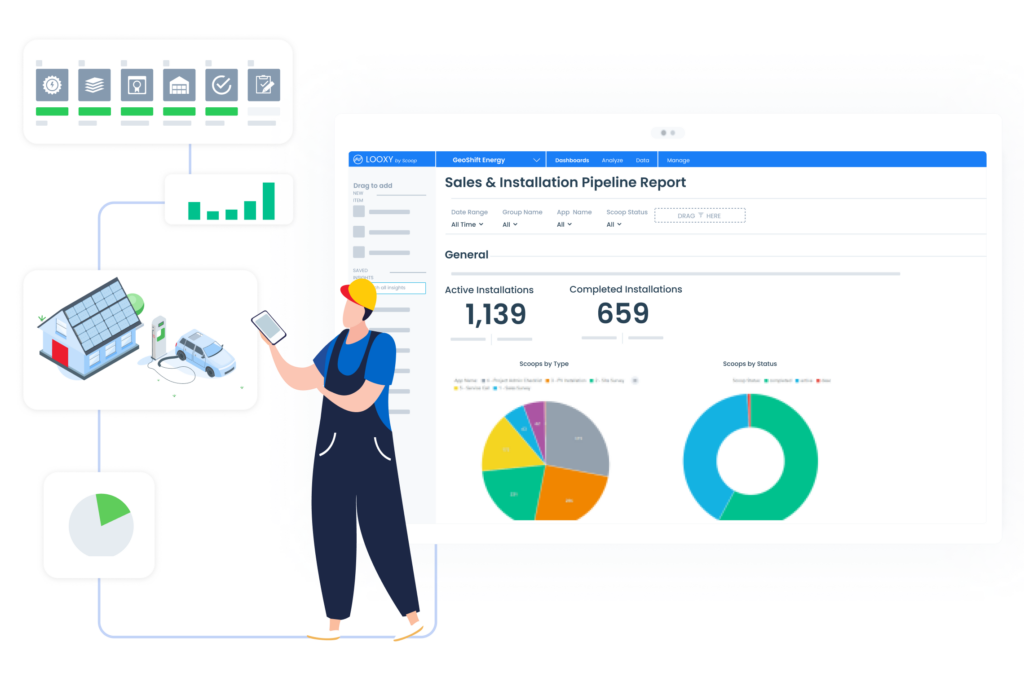
What Scoop does best. Scoop is the operations layer. We built it so that a project created from a signed proposal carries its own workflow: the next stage opens by itself when the previous one closes, the right checklist and plan set land on the technician’s phone whether or not there is signal on the roof, and the closeout package assembles itself from what the crew captured rather than from what somebody remembers to upload afterwards. The same engine runs new installs, service calls and recurring O&M work orders, which is the part most tools in this category do not attempt.
Pricing. Unlimited users, storage and devices on every plan, including partners and subcontractors at no per-seat charge.
Best for. High-volume residential installers, commercial installers running repeatable multi-site work, O&M providers with recurring service contracts, and renewable energy companies managing partner-led project delivery.
Scoop limitations.
- Scoop does not design PV systems, run shading simulations or produce stamped plan sets. That work stays in your design tool, and Scoop connects to them.
- Scoop is built for operations teams ready to configure the platform around how they actually run field work. That configuration takes real time from someone on the team. Companies with a dedicated owner for that setup, and the budget to see it through, get value starting on day one.
- Scoop delivers the most value where there is a repeatable process to standardize, while leaving room for workflow customization based on project type or AHJ. The more your projects follow a recognizable shape, the faster the workflow automation compounds.
Verdict. Scoop is the right operations layer for installers, EPCs and O&M providers who have outgrown spreadsheets and want one system of record for delivery, from the signed contract through the length of the service contract.

The Rest of the Operations Layer
- Sunbase starts at $59 per user per month and is configured rather than tiered, which suits small residential installers who want a single tool and will accept whatever the configuration produces.
- ServiceTitan publishes tier names, Starter, Essentials and The Works, but no prices, and charges per technician. It is genuinely excellent at high-volume residential service dispatch, and it is built around trades service calls rather than solar project delivery. It acquired Conduit Tech in September 2025.
- Jobber runs $29 to $399 a month on annual billing with bundled user counts, and Housecall Pro runs $59 to $299 a month with extra users at $75 to $100. Both are strong for teams of two to fifteen doing service work, and both stop short of multi-crew project delivery.
- Monday.com at $9 to $19 per seat per month is enough for companies running below roughly ten projects a month. There is no offline field app and no solar-specific execution logic, but you can shape a board in an afternoon.
- Procore publishes no pricing, sells annual contracts with unlimited users, and is the right pick for construction-led EPCs. It acquired Datagrid in January 2026 and agreed to acquire DroneDeploy for about $845 million in July 2026.
We rank this layer in more depth on our best field service management software and solar software companies roundups.
Layer 5. Solar O&M, Service and Asset Performance Software
The O&M layer is the layer most stack articles forget, and it is the one with the longest revenue tail. A system you installed in 2019 is now seven years into a twenty-five year service relationship, and the 4.9 million distributed systems Lawrence Berkeley National Laboratory tracks through 2024 are all somebody’s recurring work orders.
Two different jobs live here and they need different tools. Performance monitoring tells you a system is underproducing. Service execution gets a qualified technician to it with the right part, proves the SLA was met, and shows the client the asset history. Monitoring platforms do the first job. Scoop does the second.
- SolarEdge Monitoring ships with a prepaid five-year data plan, then renews at $44.99 a year for residential systems under 15 kW, $99.99 for 15 to 200 kW and $249.99 above 200 kW.
- Enphase Enlighten gives homeowners per-panel energy data free in the app, with a paid Enlighten Manager upgrade available monthly or as a lifetime license. Enphase does not publish the upgrade price.
- AlsoEnergy PowerTrack is the enterprise asset performance platform for utility-scale and large C&I owners, and publishes no pricing.
- Scoop carries the execution half: recurring preventive maintenance schedules, dispatch to the right technician, offline inspection checklists, warranty and SLA evidence, complete asset history, and the handoff from dispatcher to technician to client-ready report.
This matters more each year because the losses are real and recurring. IEA-PVPS reports that soiling alone is responsible for 4 to 7 percent of global energy losses across PV fleets, and every point of that is a truck roll somebody has to schedule, justify and prove.
Layer 6. Solar Customer Experience Software
The customer experience layer keeps the homeowner informed between the signature and the switch-on, which is the stretch of the project where cancellations and one-star reviews come from. It is a genuine layer, and it is also the layer most easily faked by a well-written email sequence.
- Bodhi is the established option in residential solar, free for up to five new projects a month and sixty in total, with Starter and Pro sold in project packages whose prices are not published. Bodhi joined the OneEthos and Climate First Corp family in March 2026.
- If you do not want a separate tool, the alternative is to trigger customer updates from the project milestones you already track in the operations layer, which is how most of the commercial and O&M teams we work with handle it. The update is only as good as the milestone data behind it, which is the argument for making operations the source.
Layer 7. Accounting, Documents and the Integration Glue
The last layer is the one nobody puts on the diagram and everybody pays for. Accounting, e-signature and the connective tissue between the other six.
- QuickBooks Online runs $38 a month on Simple Start to $340 on Advanced, with seats bundled per plan. It is what your bookkeeper already uses, and the integration that matters is invoicing off completed milestones rather than off a spreadsheet. Scoop has a live QuickBooks integration.
- DocuSign is $11 a month for Personal, $30 per user per month for Standard and $45 for Business Pro on annual billing, with a 100-envelope-per-user-per-year allowance on the paid tiers.
- Zapier is free for 100 tasks a month and starts at $19.99 on Professional. It is the right tool for a gap with no native connector and the wrong tool for a connection your business depends on daily, because task pricing scales badly and a broken Zap fails silently.
- GLOO is Scoop’s integration service, and it connects 500+ software tools. It is the foundation for many powerful software stacks and it is how the field-level data, not just the record header, moves between layers.
What a Solar Software Stack Actually Costs in 2026
We could not find a single published, sourced answer to the most common question buyers ask, so we built one.
Below are two complete stacks for the same ten-person residential installer, priced entirely from vendor-published pages on 1 September 2026, covering six of the seven layers.
The operations layer is excluded from both totals because two of the credible options in that layer publish no pricing.
| Layer | Premium path | Annual cost | Lean path | Annual cost |
|---|---|---|---|---|
| Design and proposal | Aurora Solar Basic, 3 seats | $4,860 | OpenSolar core plus accounting connector | $588 |
| CRM and pipeline | HubSpot Sales Hub Professional, 5 seats | $5,400 plus $1,500 one-time | Zoho CRM Standard, 5 seats | $840 |
| Accounting | QuickBooks Online Plus | $1,680 | QuickBooks Online Simple Start | $456 |
| E-signature | DocuSign Standard, 3 seats | $1,080 | Included in proposal tool | $0 |
| Integration glue | Zapier Professional | $240 | Zapier Free | $0 |
| Total, six layers | $13,260 a year, $14,760 in year one | $1,884 a year |
That is a seven-times spread on identical layer coverage, and it is the single most useful number on this page. Two conclusions follow, and neither is the one vendors want you to draw.
- Software cost is not your constraint. The Bureau of Labor Statistics projects solar photovoltaic installer employment to grow 37 percent between 2025 and 2035 with about 4,200 openings a year, with another 60 percent calling it somewhat difficult.
- Spend those savings on the layer you cannot buy twice. The design and CRM layers are commodity purchases with obvious substitutes. The operations layer is the one that has to be configured around how your team actually works, and it is the one that compounds. This is why we rank on handoffs rather than on feature counts.
Our own calculation from vendor-published list prices, 1 September 2026. It is an illustration of the spread, not a quote. Actual costs vary with seat count, project volume, commitment term and negotiated discounts.
Which Solar Software Stack Should You Build?
The right stack depends on volume, segment and who owns the configuration. Six honest recommendations.
- A five-person residential installer under ten projects a month. OpenSolar for design and proposals, Zoho CRM or HubSpot Free for pipeline, Monday.com for project tracking, QuickBooks Simple Start. About $1,900 a year. Move to a real operations layer when you cross roughly fifteen projects a month or add a second crew, whichever comes first.
- A high-volume residential installer. Aurora Solar for design, HubSpot for CRM, Scoop for operations, Bodhi or milestone-triggered updates for customer experience, QuickBooks for accounting.
- A commercial and industrial installer. HelioScope for design, Salesforce or HubSpot for CRM, Scoop for multi-site execution and closeout evidence, Procore only if a general contractor requires it. ENGIE Services saved $179,000 running C&I work this way.
- An O&M provider or a service business. Scoop for work orders, preventive maintenance schedules and SLA evidence, plus whichever monitoring portal matches your inverter fleet, and a mixed-fleet analytics layer if you service more than one brand.
- A utility-scale developer. RatedPower or PVcase for plant design, PVsyst for the bankable yield study, AlsoEnergy PowerTrack for asset performance, and a construction-grade execution layer for the build.
- A partner-led or TPO business. Solargraf or Enerflo for financing-aware proposals, Scoop for delivery across your installer network, and integrations to your financing partners.
Stop Paying for Tools That Do Not Talk to Each Other
If you recognized your own stack in the section above, the gap is almost certainly not a missing tool. It is the seam between two tools you already own, and the hours your team spends every week carrying data across it by hand. That work is invisible in every budget, which is why it survives.

Bring one of your own projects to a demo and the Scoop team will map your actual stack, seam by seam, and show you what a clean handoff looks like on your data rather than on ours. Most teams start with a twenty-minute discovery call first, so the demo is about your operation instead of a feature tour. Book a demo. No credit card, no obligation, same business day response.
Frequently Asked Questions About Best Solar Software Stack
What is the best integrated software stack for solar?
The best integrated stack for solar pairs one specialist design tool with one operations platform that owns execution, and connects the rest to that operations layer rather than to each other. For most US installers that means Aurora Solar or OpenSolar for design and proposals, HubSpot or Salesforce for CRM, Scoop for project and field operations including recurring O&M work, and QuickBooks for accounting. Integration depth is what makes it integrated: check that the connection writes back at field level, not just that a logo appears on a marketplace page.
What is the best simulation software for solar systems?
PVsyst is the industry standard for solar simulation and is the tool lenders and independent engineers expect behind a bankable P50 or P90 energy yield report, at CHF 700 a year for the Professional license. The National Renewable Energy Laboratory’s System Advisor Model is the standard free option for research and financial modeling, HelioScope is preferred for commercial yield work, and PV*SOL handles complex shading and hybrid systems.
What is the best software for monitoring solar energy?
The best solar monitoring software depends on your fleet composition, not on features. Single-brand residential fleets should use the inverter manufacturer’s own portal, which is Enphase Enlighten or SolarEdge Monitoring, because the data is free, or close to it, and already module-level. Mixed-brand commercial portfolios need a hardware-agnostic analytics layer. Utility-scale asset owners use enterprise asset performance platforms such as AlsoEnergy PowerTrack. Monitoring tells you a system is underproducing; a separate service execution layer is what actually gets a technician to it and proves the SLA was met.
Is an all-in-one platform or a best-of-breed stack better for a solar company?
Best of breed wins at the specialist layers and consolidation wins at the operations layer. Design accuracy, shading analysis and bankable yield reports are specialist engineering work worth paying a specialist for, and no all-in-one platform matches a dedicated design tool there. Project delivery is the opposite: a project cannot have two owners, so one system should hold the schedule, the field work and the closeout evidence. The failed version of both approaches looks the same, which is three tools each claiming to know where a project stands.
How much does a solar software stack cost?
Priced from vendor-published pages on 1 September 2026, a ten-person residential installer pays about $13,260 a year for a premium stack covering design, CRM, accounting, e-signature and integration glue, plus a $1,500 one-time onboarding fee in year one. The same six layers assembled from free and entry tiers cost about $1,884 a year. That is a seven-times spread on identical coverage, which means software list price is rarely the deciding factor. The operations layer is quoted separately by most vendors in that category.
How many software tools does a solar company actually need?
Four systems of record cover most installers: a design tool, a CRM, an operations platform and an accounting package. Everything else in the seven layers should either be a feature of one of those four or connect to them. If you are running more than six tools and cannot name which one is authoritative for project status, you do not have a stack, you have overlap, and the fix is to pick an owner for each piece of data rather than to buy anything.
What is the best tech stack for a solar company just starting out?
Start with OpenSolar for design and proposals at no license cost, Zoho CRM or HubSpot Free for pipeline, Monday.com for project tracking and QuickBooks Simple Start for accounting, which is about $1,900 a year in total. Add a dedicated operations platform when you cross roughly fifteen projects a month or add a second crew, because that is the point at which manual handoffs start costing more than the software would. Do not buy a tool for a layer you are not yet losing time on.
Disclosure
Scoop builds and sells the operations platform ranked first in the project and field operations layer, and we compete with several tools named on this page. The rankings are our editorial opinion, formed from working with solar installers, EPCs and O&M providers since 2016, and they are not paid placements. No vendor on this page paid to appear or reviewed the copy before publication. All pricing was taken from each vendor’s own published pricing page and verified on 1 September 2026, and pricing changes frequently, so check the vendor before you budget. Customer results cited on this page are reported by those customers and are not independent benchmarks. All trademarks belong to their respective owners. If we have a fact wrong, tell us and we will correct it.