
In field service, a single visit often isn’t enough, and plenty of service calls still end with a technician heading back for a second trip.
More often than not, the gap between a single service call and additional truck rolls comes down to what the technician writes down on site: the customer details, the equipment condition, and the work actually performed. Capturing all of that cleanly is what protects revenue, speeds up billing, and keeps maintenance on schedule.
This guide covers what every field service report should include, how to write one in five steps, the best practices that keep your team’s reporting consistent, and how a report built on paper or a mobile form turns raw field information into a document and a lasting record the whole operation can rely on.
What Is a Field Service Report?
A field service report is a document a technician completes after performing service, repair, or maintenance at a customer site. It captures the who, what, where, when, and how of a single service call: who did the work, what they found, where and when it happened, and how the issue was resolved. Done well, it becomes the official record of the visit that anyone can reference long after the truck has left.
The report’s primary job is to give everyone a complete picture of the work performed, the resources and parts used, and the equipment details captured on site. That information feeds three things at once: proof of service for the customer, an internal record for the service provider, and the documentation billing needs to invoice accurately. Whether it’s filled out on a paper form or a mobile app, the goal stays the same, an accurate account of the visit that holds up later.
It helps to separate a field service report from a field inspection report, because the two are easy to confuse. Service reporting centers on action and resolution, so it’s tied to a work order: a technician was dispatched, did something, and documented the outcome. An inspection report centers on assessment and compliance, which ties it to a safety or maintenance schedule rather than a specific repair. Same field, different purpose.

What Should a Field Service Report Include?
A complete field service report includes far more than a quick ‘job done’ note. The strongest reports organize information into four logical groups: identification and context, equipment and parts, the work performed, and verification and sign-off.
Each group captures a different layer of details, from customer contact information to the technical data behind the repair, so the finished document reads as one clean record instead of scattered notes.
These are the four groups every strong report should include, and covering all of them, whether on paper or in a mobile form, is what separates a report you can act on from one that raises more questions than it answers.
What Are Identification and Context Fields?
Identification fields tie the report to one specific job so nothing gets confused with the next call. At a minimum, this part of the record should capture the core identifying information:
- The work order or job reference number
- Customer and company contact details
- Technician name and ID
- Service address, date, and the start and end time
Getting these right is what makes follow-up possible, because a dispatcher can trace any question back to the exact visit, technician, and time it happened.
What Equipment and Inventory Details Are Required?
This section identifies the asset that was serviced and everything consumed to fix it, and it captures the condition that asset was in. Technicians should record the equipment make, model, and serial number, along with the parts and materials used during the visit. Equally important is the state of the equipment itself, both before and after the work, so the report reflects exactly what the technician found on-site and what changed by the time they left.
Photos carry much of that weight. Before and after images prove the condition of the equipment and the way it was set up, giving the whole team a clear point of reference long after the visit. That visual record supports warranty claims, builds a maintenance history for the asset, strengthens internal tracking, and protects the business on liability if a question surfaces months down the line.
The catch is where those photos end up. Many field teams snap pictures on a personal phone, then text, email, or upload them to a drive, leaving the images and the written notes scattered across several places. Capturing the equipment details, condition, and photos in one mobile reporting tool keeps the full record together, so the back office can pull up the notes and images in one place instead of chasing them down.
Work Performed and Issues Found
Here is where the technician explains what was actually wrong and what they did about it, and it’s the narrative core of the report. Strong reporting uses specific, technical language for the tasks performed, the diagnosis, the adjustments, and the repairs, instead of a vague summary. ‘Replaced condenser fan motor (Part #X12345), tested amperage, verified operation’ gives operations a complete account of the process; ‘fixed the unit’ does the opposite and can create a dispute over what was actually done.
Verification and Sign-Off
The final group closes out the visit and makes it defensible. Before and after photos, a customer signature, and the final departure time turn the document into a verifiable record for billing and compliance. A digital signature captured on-site also confirms the customer agreed the work was complete, which protects you if anyone questions the job months later.
How Should a Field Service Report Be Written?
Writing a strong report is less about effort and more about process. The biggest difference between a report you can trust and one you can’t is timing: technicians who document the work in real time, using a form on their phone as they go, capture far more accurate information than anyone relying on end-of-day recall. The five steps below turn that habit into a repeatable routine that helps you create a complete, defensible record every time.
1. Verify and Record Service Context
Before any work begins, confirm the basics and write them down. Lock in the customer name, the site address, the equipment model and serial number, and the reason for the call, so the report starts from accurate information rather than memory. Grounding the record in verified details up front prevents small errors from snowballing through billing and follow-up later.
2. Document Actions During Service
Capture each action as it happens, not hours later. Note the diagnosis, the adjustments, and the repairs in specific technical language, treating documentation of the work performed as part of the job rather than an afterthought. Logging tasks in the moment keeps the process honest: waiting until end-of-day is how details get blurred and a routine maintenance call turns into a fuzzy summary that helps no one in operations.
3. Track Resources and Capture Evidence
Accurate reporting also means accounting for what the job consumed. Log labor time honestly, track the parts, materials, and equipment used with their model or part numbers, and capture before and after photos as visual proof. That data turns the record into something billing and warranty teams can stand behind, instead of an estimate written from memory.
4. Record Observations and Follow-Up Needs
Good technicians document more than the immediate fix. Note anything observed on site that could need attention later, a worn belt, a corroded fitting, a unit running hot, even when it isn’t critical today, and flag any incomplete tasks that require a return visit. A clear note lets the team track those issues so they protect long-term performance and a small maintenance need never disappears between service calls.
5. Get Formal Customer Sign-Off
Close the visit with the customer, not after you’ve driven away. Review the completed report together, capture a digital signature confirming they’re satisfied, and log the final departure time. That sign-off formally ends the service event, makes the document defensible for billing, and gives both sides easy access to an agreed account of what happened.
What Are the Best Practices for Field Service Reporting?
Knowing what goes into a report is one thing; getting consistent, high-value reports out of a whole team is another. The best practices below tighten the entire reporting process, from how a form is built to how its data moves downstream, so field documentation actually improves operations instead of just recording them. Most come down to two ideas: standardize what you can, and let digital tools and management software carry the rest so nothing depends on memory or good handwriting. Teams that follow them track more, argue less, and close jobs faster.
Standardize Report Formats Across Teams
Build one template and have every technician fill it out the same way. When everyone uses the same form, reports get easier to review, onboarding speeds up, and audits stop being a scramble. Standardizing the format also strips guesswork out of the process and frees management to focus on real problems instead of chasing missing fields, and it costs nothing to create a free starting template your team can refine over time.
Use Mobile-Friendly Tools for Field Reporting
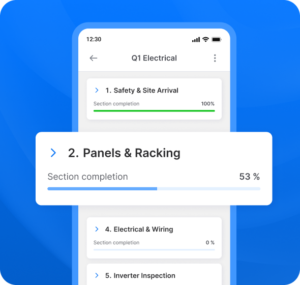
When technicians spend their day in the field instead of at a desk, the reporting tool has to travel with them. A mobile app lets them capture details, snap photos, and complete the report on-site, even offline, using automatic sync the moment a signal returns. Digital, mobile-first software shrinks the gap between finishing a job and filing the report, and it gives the back office real-time access to what just happened.
Train Technicians on Proper Documentation
Tools only help if the people using them know what good looks like. Teach each technician which information actually matters and why a vague ‘fixed it’ creates problems downstream, then spot-check submitted reports to catch inconsistent terminology or missing fields. Making documentation part of onboarding and ongoing coaching is key to steady reporting performance, and those spot-checks double as a map of where more help is needed.
Include Photos and Visual Evidence
A photo settles arguments that words can’t. Before and after images document completed work, capture pre-existing damage, and provide the proof that warranty claims and customer disputes hinge on. Most mobile reporting tools let technicians attach images straight into the report, which makes visual evidence a key upgrade to any record, easy to add and hard to argue with.

Sync Report Data to Back-End Systems
Push report data into your back-end systems automatically instead of retyping it. The numbers should flow straight into billing, scheduling, CRM, and asset management rather than sitting in a digital file nobody opens. Routing reports through your field service management software eliminates manual re-entry, closes data silos, and can generate an invoice the instant a job is marked complete, keeping operations moving without extra clicks.
Secure Digital Signatures
Captured on a phone or tablet, a digital signature replaces the clipboard for good. It gives you timestamped, defensible proof the customer accepted the work, and it keeps approvals from getting lost or smudged. Every completed document then carries clear acknowledgment that anyone with the right access can pull up later.
Set Up Real-Time Reporting Workflows
Once a report is submitted, the right workflow can take over. A real-time field service management workflow can generate an invoice, flag follow-up work, update the CRM, and notify a supervisor automatically, with no one lifting a finger. Wiring management and operations together this way moves a team from reactive to proactive, and the right software makes those triggers simple to configure.
Which Industries Use Field Service Reports?
Any business that sends technicians to a customer site relies on field service reports, regardless of what they’re servicing. The format flexes to fit the trade, but the need for a structured record is universal, and the field service management challenges each industry faces tend to surface first in how well its teams document work:
- HVAC and refrigeration: equipment readings, refrigerant logs, and recurring maintenance visits.
- Plumbing and electrical: code compliance, parts replaced, and safety checks.
- Construction and real estate: site progress, punch lists, and contractor sign-offs.
- Modular construction: factory-built module checks, on-site assembly, and installation sign-offs.
- Telecom and utilities: network installs, outage repairs, and asset locations.
- Renewable energy: solar array installs, inverter diagnostics, and recurring panel maintenance.
Whatever the company does, structured reporting gives management a reliable account of operations from the first dispatch to the final invoice.
How Does Field Service Reporting Affect Operational Performance?
Field service reports are raw data that drives operational performance. Every completed report feeds the numbers a business actually manages by, including first-time fix rate, technician utilization, average resolution time, billing accuracy, and SLA compliance.
The link is direct: teams with higher first-time fix rates consistently see stronger customer retention and SLA compliance than those that miss on the first visit. Cleaner reporting is what lets a team track those field service management metrics accurately, and that visibility is the key difference between reacting to problems and managing operations on purpose.
Streamline Field Service Reporting With Scoop
Strong field service reports are only as valuable as what your business does with them. Scoop works as a Central Operations Hub that connects field reporting to scheduling, dispatch, workflows, and billing in one place, turning individual reports into a connected operational layer your whole company can see in real time, without ripping out the management tools you already use.
With the field service management market growing quickly, that kind of connected visibility is fast becoming table stakes. Explore Scoop’s field reporting software and its mobile app to tie every report to the rest of your operations, and put your field data to work.
Frequently Asked Questions About Field Service Reports
What Is the Difference Between a Field Service Report and a Work Order?
A work order comes first: it assigns the job, defines the scope, and sets expectations before a technician arrives. A field service report comes during and after the visit, documenting what actually happened on-site and confirming whether the planned scope was completed.
Who Is Responsible for Writing Field Service Reports?
Writing the report falls to the field technician who did the work, usually during the visit or right after wrapping up. Supervisors then review each one for quality and completeness before back-office teams use the data for billing, scheduling, and compliance.
How Long Should a Field Service Report Take to Complete?
With a standardized digital template, most reports take 5 to 10 minutes to complete, while paper-based or free-form reports usually run 15 to 30 minutes. That faster turnaround, with less back-office cleanup, is one of the clearest payoffs of going digital.
Can Field Service Reports Be Used for Compliance and Audits?
Yes, a field service report is a formal record of the service performed, the resources used, and the customer’s acknowledgment, which makes it solid evidence during an audit. Regulated industries like HVAC, electrical, and medical devices lean on these reports as their compliance documentation.
What Is the Best Software for Field Service Reporting?
The best tool depends on your team’s size and how complex your operations are, so look for mobile-first design, offline capability, customizable templates, digital signatures, photo capture, and tight integration with your scheduling, dispatch, and billing systems. Software that connects reporting to the rest of your operations, rather than leaving it stranded in a separate app, delivers the most value over time.