Solar and renewable energy companies rely on a growing mix of software to manage projects involving solar panels, battery storage systems, and ongoing service work from sales through installation and commissioning. A typical stack may include a CRM, design software, scheduling tools, field reporting apps, accounting systems, and monitoring platforms.
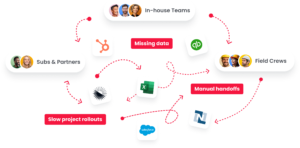
The problem is that many of these systems do not share information.
Teams end up re-entering data, chasing updates, and manually moving information between departments. Sales hands off projects to operations. Operations hands off work to the field. The field hands documentation to finance. Every manual step creates opportunities for delays and errors.
This integration checklist for solar and renewable energy companies provides a practical framework to evaluate your current systems, prioritize improvements, and connect the tools you already use without disrupting active projects.
Why Are Software Integrations Important in Solar and Renewable Energy?
Software integrations are important because solar projects depend on information moving accurately between sales, operations, field teams, and billing.
When systems are disconnected, teams spend time creating duplicate records, manually transferring information, and verifying data across multiple platforms. Reporting arrives late, handoffs are missed, and invoicing slows down.
For example, a sales rep may close a project in a CRM, but operations still has to manually create the project in a separate scheduling system. Later, a field crew completes the installation and submits photos, inspection results, and equipment information through another tool. If those updates do not automatically reach finance, billing may be delayed even though the project is complete.
Over hundreds of projects each year, these inefficiencies create unnecessary operational cost. Integrations help reduce manual work, improve data accuracy, and ensure information flows reliably from sales through installation, service, and billing.
What a Successful Integration Strategy Looks Like for Renewable Energy Teams
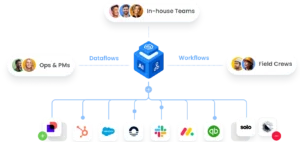
A successful integration strategy does not require replacing every system your company uses. Instead, it creates a connected operational layer that allows information to move automatically between teams and tools.
In a well-integrated process, a closed opportunity in a CRM can automatically create a project record for operations. Field updates can sync back to the office without manual data entry. Completed work can trigger billing workflows, ensuring invoices are generated on time and project information remains consistent across systems.
The goal is not simply to connect software. It is to create reliable, repeatable workflows that support long-term growth, improve access to information, and maintain consistent data standards across the business.
Before investing in new technology, evaluate how well your current systems work together. In many cases, the biggest gains come from improving the connections between existing tools rather than replacing them altogether.
1. Audit the Solar Tech Stack and Current Data Flows
Start by mapping every system used across the project lifecycle. This typically includes a solar CRM, design software, scheduling or dispatch tools, field reporting platforms, accounting or ERP systems, and monitoring software.
For each system, evaluate where information is created, updated, and re-entered. Look for manual handoffs, spreadsheets, email updates, and duplicate records. Pay particular attention to project requirements, site information, customer records, and status updates that move between teams.
A simple audit table can help organize the process:
| System | Owner | Data In | Data Out | Pain Points |
|---|---|---|---|---|
| HubSpot | Sales | Leads, proposals | Closed-won projects | Duplicate data entry |
This exercise reveals where information gets stuck, where duplicate work occurs, and which integrations will have the biggest operational impact.
2. Prioritize Integrations by Operational Impact
Not every integration needs to happen at once. The most effective approach is to prioritize based on effort versus impact.
Evaluate each potential integration based on the number of manual entries it eliminates, its ability to reduce errors, its impact on billing cycles, and any compliance or service-level risks it addresses. The goal is to identify the right projects that deliver measurable business benefits quickly.
High-ROI integrations often include:
- CRM → automatic project or work order creation
- Field completion → invoice generation
- Scheduling ↔ field status synchronization
These integrations typically reduce administrative cost, improve visibility, and create faster operational workflows without requiring significant process changes.
3. Identify Interconnection and Compliance Requirements That Affect Data Consistency
Solar and renewable energy projects depend on accurate tracking of permits, inspections, utility submissions, interconnection applications, and permission to operate (PTO) milestones.
To ensure compliance, key project information should remain consistent across every system. This includes customer addresses, project IDs, system size, equipment models, status fields, utility information, and interconnection milestones.
Without standardized data, teams may end up managing different versions of the same project. That can create delays, compliance issues, and reporting inaccuracies.
Establishing common data standards early helps ensure that local requirements, utility submissions, and grid interconnection processes are tracked consistently throughout the project lifecycle.
For example, if a project address, utility account number, or equipment model is entered differently across systems, permit approvals, inspections, and interconnection milestones may be delayed.
4. Choose an Integration Approach That Scales
There are several ways to connect software systems, each with different tradeoffs.
Native integrations are often the easiest to use but may only support limited workflows. iPaaS platforms provide more flexibility but typically require internal resources to build, monitor, and maintain connections. Custom API integrations offer maximum control but often require ongoing development support.
Managed integration services provide a middle ground by handling implementation, monitoring, security, and maintenance on behalf of the customer.
When evaluating options, consider long-term scalability, monitoring requirements, security controls, maintenance effort, and the level of support your team will need. The best approach is usually the one your organization can realistically maintain as the business grows.
5. Map Data Fields and Automate Workflows End-to-End
Once priorities are established, map how information should move between systems.
Field mapping simply means identifying which data should transfer from one platform to another. Workflow automation defines what happens when a specific event occurs.
Common examples include:
- Deal closed → project created
- Job status updated → office notified
- Job complete → invoice generated
Successful automation depends on good data hygiene. Establish consistent naming conventions, required fields, and deduplication rules across every system. Small inconsistencies can create significant issues as project volume grows.
When done correctly, automation improves efficiency, reduces manual work, and creates a more reliable installation process.
6. Test Integrations Before Rollout
Before deploying integrations across the company, test them thoroughly.
If possible, use a sandbox environment to validate workflows without affecting live projects. Test field-level data transfers, permissions, notifications, and edge cases that may occur during real operations.
A phased rollout often works best. Start with a small group of users, validate results, and expand gradually as confidence grows.
Document ownership, troubleshooting procedures, and escalation paths before launch. Clear documentation helps maintain performance, supports adoption, and makes it easier to resolve issues if problems arise later.
7. Monitor Integration Performance Over Time
Integration is not a one-time project. It requires ongoing management and continuous improvement.
Establish a regular review cadence and track KPIs such as sync failure rates, manual entries eliminated, time saved per project, billing cycle reduction, and rework caused by bad data.
As new software is added and business processes evolve, integrations should evolve as well. Monitoring helps identify issues before they impact operations and ensures workflows continue delivering value.
The most successful renewable energy companies treat integration as a long-term operational strategy rather than a one-time implementation. Regular reviews help reduce inefficiencies, improve performance, and maximize the value of the technology stack over time.
Common Integration Mistakes Solar Companies Make
Even with a strong checklist, integration projects can go off track if teams overlook a few common pitfalls.
One mistake is trying to connect everything at once. Large integration projects can become difficult to manage, making it harder to identify issues and measure success. Most companies see better results by starting with a few high-impact workflows and expanding over time.
Another common problem is a lack of data standards. If customer records, project statuses, equipment names, or site information are entered differently across systems, integrations may move inconsistent data faster rather than improving the process.
Companies also often underestimate ongoing maintenance. Software changes, API updates, and evolving business requirements can affect integrations over time. Without clear ownership and monitoring, workflows that once worked reliably may begin to fail.
Finally, many organizations skip documentation. Every integration should have an owner, documented workflows, and troubleshooting procedures. Good documentation is important for long-term success and helps ensure integrations continue supporting the business as teams grow.
Connect Solar Operations With Scoop
The goal of integration is not simply to connect software. It is to create a more efficient operational process from sales through installation, service, and billing.
Scoop serves as a Central Operations Hub that helps renewable energy companies manage work across teams while reducing manual handoffs and improving visibility. By connecting project information, field updates, documentation, and operational workflows, teams can work from the same source of truth throughout the project lifecycle.
For companies looking to connect existing tools, Scoop’s solar CRM and operations platform works alongside the systems you already use rather than requiring a complete replacement.
The GLOO integration service provides a managed integration layer that helps connect CRM, design, scheduling, field service, accounting, and monitoring platforms through one scalable framework with ongoing monitoring, maintenance, and support.
Learn more about Scoop’s solar software and how connected operations can help reduce manual work, improve data quality, accelerate billing, and create better visibility across your organization.
Frequently Asked Questions About Integration for Solar and Renewable Energy Companies
What Systems Should Solar Companies Integrate First?
The highest-ROI integrations are usually CRM-to-project-management and field-reporting-to-invoicing workflows. These connections eliminate manual data entry, reduce handoff errors, and accelerate billing. Secondary priorities often include design software synchronization, monitoring platforms, and scheduling systems. The best starting point depends on where your company experiences the most friction, but integrations that directly impact project execution and cash flow typically deliver the fastest results.
What Is the Typical Timeline for Solar Operations Software Integration?
Timelines vary based on the integration method and complexity of the process. Native integrations may be deployed in days, while managed services and more complex workflows often take several weeks. After go-live, most companies should expect a stabilization period focused on data quality monitoring, user adoption, and workflow refinement. Integration should be viewed as a long-term operational improvement rather than a one-time project.
What Does Solar Software Integration Cost?
Costs vary significantly by approach. Native integrations may have little or no additional cost, while iPaaS platforms typically involve subscription fees and internal administration. Managed integration services generally have implementation and ongoing support costs. When evaluating options, it is important to consider the cost of manual data entry, delayed billing, reporting errors, and operational inefficiencies. For many companies, the cost of not integrating can exceed the cost of the integration itself.
Can Small Solar Companies Benefit From System Integration?
Yes. Small teams often feel the impact of disconnected tools more acutely because fewer people are available to manage manual processes. Even a single integration can help reduce administrative work and improve visibility. Many companies start by connecting their highest-friction workflow and expand over time. The benefits of integration are often noticeable long before a company reaches enterprise scale.
What Is the Difference Between Native Integrations and Managed Integration Services?
Native integrations are built and supported by software vendors and typically connect specific platforms using predefined workflows. Managed integration services provide custom connections, ongoing monitoring, maintenance, and support across a broader range of systems. Native integrations may be the right choice for simple requirements, while managed services are often the best option when companies need flexibility, scalability, and long-term reliability.
How Do Solar Companies Handle Data Security During System Integration?
Security should be a core consideration for every integration project. Important safeguards include API authentication, encrypted data transfer, role-based access controls, third-party connector permissions, and documented data governance standards. Companies must ensure that information is only accessible to authorized users and that integrations meet both internal requirements and vendor security standards.
Does System Integration Require Downtime for Solar Field Operations?
In most cases, no. Modern cloud platforms and managed integration services often support live deployment without interrupting installation activities. The best approach is to use sandbox testing when possible and roll out changes in phases. This process helps minimize risk, maintain performance, and provide support for users as new workflows are introduced.
How Do Multi-Location Solar Companies Manage Cross-Office Integration?
Cloud-based integration platforms allow data to sync across offices without requiring location-specific infrastructure. A centralized integration layer ensures that project information, site updates, customer records, and operational workflows remain consistent regardless of office location. This provides better access to information, supports local teams, and creates a more unified business process across the organization.