Understanding CRM and field operations what data should flow and in which direction is critical for companies managing both customer relationships and field execution. Many organizations connect CRM and field service tools without defining which system owns specific records. This creates duplicate records, inconsistent information, and operational delays. A strong CRM field service data flow strategy ensures every team works from accurate data while reducing manual updates across systems.
Most companies split responsibilities between multiple platforms. CRM manages customer identity, lead records, sales activity, and contract details. Field operations software manages scheduling, dispatch, work orders, and execution updates. Problems appear when businesses fail to define which information should move where. Teams start manually entering updates across different systems, creating confusion and reducing data quality over time.
According to FormAssembly’s 2025 State of Digital Maturity report, 98% of organizations relying heavily on manual processes report significant inefficiencies. This highlights why CRM field ops integration is no longer optional for scaling field service organizations. Clear directional data flow rules improve operational visibility, reduce duplicate records, and create better coordination between office and field teams.
What Is CRM and Field Operations Data Flow?
CRM field service data flow refers to how information moves between customer relationship management systems and field operations platforms. It defines which system creates records, which system updates them, and which platform acts as the source of truth when conflicts appear. Without these rules, businesses struggle to maintain accurate customer information across multiple systems.
A strong source of truth CRM field service strategy prevents duplicate records and operational confusion. CRM typically owns customer identity, sales pipeline data, and contract information. Field operations platforms own execution updates, scheduling changes, service history, and technician activity. When each system manages the correct data types, integrations become more reliable and scalable.
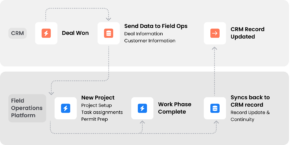
Many organizations overlook this distinction during implementation. Instead of defining ownership rules first, they attempt to sync everything in every direction. This creates unnecessary complexity, slows performance, and introduces conflicts between systems. Successful companies create clear mapping rules before automation begins.
Why Data Flow Direction Between CRM and Field Operations Matters
The direction of data flow determines whether teams can trust their records. Without clear governance, information becomes inconsistent across platforms. Sales teams may see outdated contact records while technicians work from newer field updates. These mismatches reduce confidence in reporting and create delays throughout the business.
For example, a field technician may update a customer phone number during a service visit. If that update never reaches CRM, the sales team continues using outdated information for follow-up communication. Over time, these small synchronization gaps create larger operational problems across customer management, scheduling, and invoicing.
The problem becomes worse as companies grow. More systems, more users, and more workflows increase the risk of duplicate entries and conflicting updates. A clear data sync direction field service framework ensures every system has defined responsibilities and reduces unnecessary manual work across teams.
Strong directional data flow also improves operational accountability. Teams know where records originate and where updates should occur. This prevents employees from creating redundant entries “just in case” another system is not current. The result is cleaner data and more efficient execution.
What Happens When CRM and Field Data Flow in the Wrong Direction?
Poor data flow creates operational bottlenecks that spread quickly across the organization. When integrations lack clear rules, field updates overwrite CRM information, duplicate customer entries appear, and teams lose visibility into project progress. These issues reduce operational speed and increase customer frustration.
One common problem occurs when sales updates never reach field operations. A customer may approve a revised scope of work inside CRM, but technicians continue working from outdated project details in the field platform. This creates rework, scheduling delays, and quality issues during execution.
Another common issue involves duplicate contact records. A technician creates a new customer entry inside the field app because they cannot locate the existing CRM record. The business now manages multiple versions of the same customer across different systems. Reporting quality declines because leadership can no longer trust which records are accurate.
Without a strong bidirectional CRM sync strategy, organizations spend increasing amounts of time reconciling records manually. Teams begin relying on spreadsheets, phone calls, and email threads just to verify which information is correct. This reduces scalability and slows operational decision-making.
How Field Service Companies Typically Structure Their Tech Stack
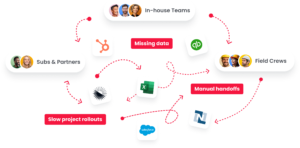
Most field service companies operate with specialized systems serving different business functions. CRM platforms like Salesforce, HubSpot, or Zoho manage sales pipelines, lead tracking, and customer communication. Separate field service management platforms handle scheduling, dispatch, work orders, and technician coordination.
Accounting platforms manage billing and financial reporting. Monitoring tools support O&M operations. Document storage systems manage contracts, permits, and project files. While each tool serves an important purpose, these systems rarely share a unified data model. Teams often bridge gaps manually using spreadsheets and email updates.
This fragmented environment creates operational silos. Office teams work primarily inside CRM while field teams rely on mobile execution tools. Without strong CRM field operations data mapping, information becomes disconnected as projects move through the customer lifecycle.
Modern organizations increasingly rely on connected operational ecosystems rather than isolated tools. Platforms like field service management software help unify scheduling, execution, and operational workflows while still integrating with CRM and finance systems.
What Data Should Flow From CRM to Field Operations?
CRM should act as the source of truth for customer identity and pre-sale project context. This information must move downstream into field operations so technicians and project managers have accurate records during execution. Without this directional flow, field teams waste time manually recreating information that already exists elsewhere.
A strong CRM field ops integration strategy ensures operational teams receive complete customer context automatically. This reduces manual data entry while improving consistency across departments. Companies using CRM with solar project management workflows often struggle when sales and execution systems are disconnected.
Customer and Contact Records
Customer names, addresses, phone numbers, email addresses, and communication preferences usually originate inside CRM during lead qualification. These records should automatically sync into field operations platforms once projects move toward execution.
Field teams depend on accurate contact information to complete work efficiently. Without synchronized customer records, technicians rely on outdated details or create duplicate entries manually. This increases operational friction and reduces reporting accuracy across systems.
Every update made inside CRM should reflect automatically in the field platform. Strong synchronization rules ensure teams always work from the same customer data regardless of which tool they use.
Sales Pipeline and Deal Context
Sales teams collect valuable operational context throughout the sales process. Scope details, timelines, financing information, project expectations, and special requirements all become essential once work begins in the field.
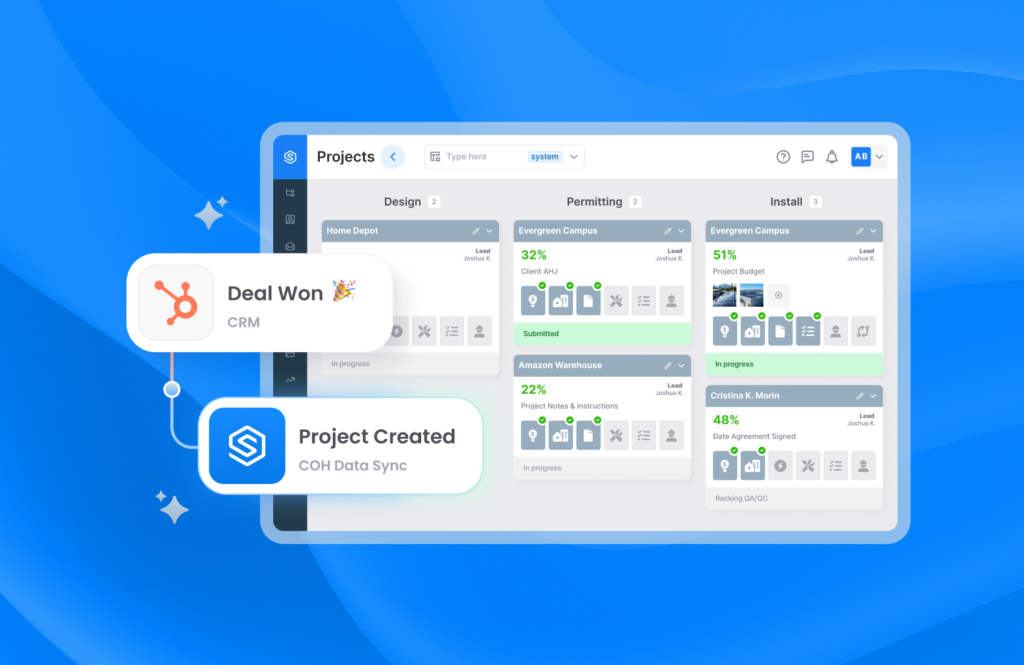
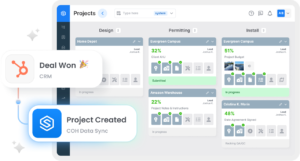
When deals close, this information should automatically create projects, work orders, and scheduling workflows inside field operations systems. Without automation, operations teams rebuild projects manually, increasing the risk of missing details and inconsistent execution.
This is especially important for companies using solar CRM workflows where project handoffs directly impact installation speed and customer satisfaction. Automated data transfer reduces delays while improving operational consistency.
Contract Terms and Service Agreements
Contractual information should also move from CRM into field operations systems. Service level agreements, warranty details, approved pricing, and customer commitments provide important execution guidance for field teams.
Field operations consume this information during project delivery, but they typically should not modify original contract records directly. CRM remains the authoritative source for customer agreements while field teams use synchronized copies for operational reference.
This structure creates stronger record integrity while ensuring technicians always have access to important project details during execution.
What Data Should Flow From Field Operations to CRM?
Once execution begins, field operations systems become the source of truth for work progress and service activity. This operational information should flow back into CRM so sales, support, and account management teams maintain complete visibility into the customer relationship.
Strong source of truth CRM field service strategies recognize that execution data belongs to field operations. CRM should consume this information rather than attempting to recreate it independently.
Job Completion and Work Order Status
Field systems should automatically push milestone updates and job completion statuses into CRM. When technicians complete installations, inspections, or service visits, sales and management teams should immediately see updated project progress.
This eliminates the need for manual reporting and improves operational transparency across departments. Leadership gains better visibility into active projects while account managers can communicate more accurately with customers.
Real-time status synchronization also improves forecasting because CRM reflects current operational realities rather than outdated assumptions.
Field-Collected Customer and Site Data
Technicians gather valuable customer intelligence during field work. Site photos, measurements, equipment details, inspection findings, and installation notes often represent the most current information available about a customer environment.
This data should flow back into CRM to enrich customer records and improve future planning. Field-generated information supports upsell opportunities, warranty management, and long-term service coordination.
Companies that ignore field-collected data create incomplete customer profiles that weaken reporting quality and reduce operational visibility across the business.
Service History and Issue Logs
Service records provide essential insight into post-sale customer relationships. Maintenance notes, defect reports, warranty claims, and resolution details should automatically synchronize from field operations into CRM.
This information helps account managers support renewals, improve customer retention, and identify recurring operational issues. It also strengthens customer communication because office teams can reference complete service histories during interactions.
Strong CRM field service data flow frameworks ensure service activity becomes part of the broader customer lifecycle instead of remaining isolated inside operational systems.
Which Data Requires Bidirectional Sync Between CRM and Field Tools?
Some information must move in both directions because both office teams and field teams actively update the same records. These workflows require more sophisticated integration rules because changes must synchronize without creating conflicts or duplicates.
Not every record requires two-way synchronization. Over-syncing often creates unnecessary complexity and performance issues. Businesses should focus on bidirectional synchronization only where both systems genuinely require update access.
Scheduling and Appointment Updates
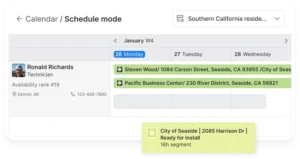
Scheduling data frequently changes throughout the project lifecycle. Sales teams may establish initial appointment commitments inside CRM while operations teams adjust schedules based on technician availability or project constraints.
Both systems must stay synchronized in real time. Otherwise, customers receive conflicting appointment information and technicians arrive with outdated schedules. Real-time synchronization is especially important for fast-moving operational workflows.
Document and File Attachments
Contracts, permits, project photos, inspection reports, and other operational documents often require visibility across multiple systems. Both CRM users and field teams need access to current documentation during execution and customer management.
A shared document strategy reduces version conflicts while improving operational collaboration. Businesses should avoid storing disconnected copies of files across separate systems whenever possible.
Customer Communication Logs
Customer communication occurs across both sales and operational workflows. Sales representatives capture lead conversations in CRM while technicians document on-site discussions during service visits and installations.
Both teams need access to this shared communication history. Missing context creates repeated customer questions and inconsistent experiences across departments. Strong bidirectional CRM sync improves coordination while helping teams deliver better customer support.
How to Define a Source of Truth for Each Data Type
A successful CRM field operations data mapping strategy begins with governance. Every company should document which system owns each record type and how synchronization should occur across platforms.
Use the following process to define ownership rules:
- Identify which system creates the record first
- Define which users can update the record
- Determine whether synchronization should be one-way or two-way
- Set conflict resolution rules for duplicate updates
- Create matching logic using email, phone number, or company name
These rules create operational clarity while reducing synchronization conflicts. Teams understand where information belongs and integrations become more predictable over time.
Businesses should also revisit these rules regularly. As workflows evolve, new systems and operational processes may require updates to the data governance model.
Common Mistakes When Mapping CRM and Field Data Flows
Even well-designed integrations fail when organizations overlook operational governance. Technology alone cannot solve poor data management practices. Businesses need structured rules and ongoing monitoring to maintain clean synchronization between systems.
Syncing Everything Without a Clear Data Map
Many companies assume syncing more data automatically improves visibility. In reality, excessive synchronization creates clutter and confusion across systems. Not every CRM field belongs inside a field app, and not every technician note needs to appear in CRM reporting.
Without a documented data map, integrations push unnecessary records in multiple directions. This slows performance while reducing usability for both office and field teams.
Ignoring Field-Generated Data in CRM Reporting
Some organizations treat CRM as the only reporting platform while ignoring execution data generated during field work. This creates blind spots in customer lifecycle reporting and operational forecasting.
Field-generated information often contains the most current operational intelligence available. Businesses that fail to integrate this data lose visibility into customer health, project quality, and service performance.
Treating Integration as a One-Time Setup
Integrations require ongoing maintenance as workflows evolve. New fields, automations, and operational requirements appear constantly as companies grow. Without monitoring, silent synchronization failures can continue undetected for weeks.
Strong CRM field ops integration strategies treat integrations as living operational infrastructure rather than static implementation projects.
Connect Your CRM and Field Operations With Scoop
Scoop acts as a Central Operations Hub that connects CRM, scheduling, field execution, and finance into one operational layer. Instead of forcing companies into rigid all-in-one platforms, Scoop helps organizations maintain their preferred software stack while eliminating duplicate data entry and disconnected workflows.
With the GLOO integration service companies can create real-time bi-directional synchronization across more than 500 connected platforms including Salesforce, HubSpot, Zoho, QuickBooks, and operational field tools.
Scoop respects source-of-truth boundaries by allowing businesses to define exactly which records flow where. CRM can remain the source of truth for customer identity and sales context while field operations own execution data and work orders. This creates cleaner synchronization, stronger reporting quality, and more reliable operational workflows across departments.
Frequently Asked Questions About CRM and Field Operations Data Flow
What Is the Most Important Data to Sync Between CRM and Field Service Tools?
Customer contact records, scheduling updates, and work order statuses are the most important synchronization points for most field service organizations. These records directly affect execution quality, customer communication, and operational visibility across teams.
Should CRM or Field Service Software Be the Source of Truth?
The answer depends on the data type being managed. CRM should typically own customer identity, sales context, and contract information, while field service software should own execution updates, scheduling activity, and work order status.
How Does Bidirectional Sync Prevent Duplicate Records?
Bidirectional synchronization uses matching rules to identify existing records before creating new ones. When updates occur in one system, integrations check for matching customer records in the connected platform and update them instead of creating duplicates.
What Tools Help Automate Data Flow Between CRM and Field Operations?
Businesses commonly use native integrations, middleware platforms, or managed integration services to automate synchronization. The best solution depends on the complexity of the tech stack and the volume of operational data moving across systems.
How Often Should CRM and Field Data Sync?
Real-time synchronization is ideal for scheduling, dispatch, customer communication, and job status updates. Less time-sensitive information may sync in scheduled batches depending on operational requirements and reporting needs.