
Across solar, storage, EV charging, infrastructure, field service, construction, and other project-driven businesses, small operational gaps can quietly become the limiting factor on growth.
In a recent webinar, the Scoop team walked through ten common breakdowns across the project lifecycle and showed how automation can prevent them.
The core idea was simple: if your process depends on someone remembering what comes next, the process itself is the risk.
The more teams, tools, projects, regions, and external stakeholders involved, the more important it becomes to build the operating process into the system itself.
The Real Problem Is Usually Between the Systems
Most growing companies already use a CRM for sales and customer records. A finance or ERP platform may manage billing, inventory, or accounting. Design teams may have specialized engineering software. Field teams may use another system entirely.
Each tool can perform its individual job well, but the challenge is what happens between them.
When one project touches several teams and several systems, someone still has to know:
- Who owns the next step?
- What information is required?
- What needs to be reviewed?
- What must happen before the job can advance?
- When should someone follow up?
- Where should the resulting documentation go?
In smaller operations, an experienced project manager or coordinator can often hold much of this in their head. That can work well, until volume outgrows what one person can track.
3 Ways Growth Makes Operational Gaps Harder to Manage
As operations scale, complexity increases in several directions at once. Teams are required to manage more projects, employees, subcontractors or partners, regions, systems, or project types. This creates three recurring problems.
1. Ownership Becomes Unclear
A project may technically be in progress, but that does not answer who is responsible for the next action.
2. Standards Become Harder to Maintain
The more people and locations involved, the harder it becomes to ensure every job follows the same required process.
3. Issues Surface Too Late
Missing documentation, skipped reviews, incorrect submissions, or incomplete field work may not be discovered until closeout, invoicing, inspection, warranty review, or a customer escalation.
To solve these issues, there are simple automations your team can put in place. Each automation takes operational load off your office team, and ensures that projects run more efficiently across each stage.
10 Ways Automation Turns Expectations Into Repeatable Actions
Here are ten places where automation can make an immediate difference.
1. Make Project Intake Complete From the Start
The first operational problem often begins before execution even starts.
Important information is missing at intake. A site detail was never captured. A required document did not make it over. A project was handed off before someone validated the information.
The next team does not discover the gap until they are already trying to work. By that point, they are no longer advancing the project. They are correcting the previous handoff.
A structured intake process can require the right information before the job moves forward. That gives downstream teams a more complete project record from the start and reduces the need to reconstruct what happened upstream.
2. Give Every Next Step a Clear Owner
One of the simplest operational failures is also one of the most common: everyone assumes somebody else is handling the next step.
A field submission is ready for review, but reviewing it is not explicitly assigned. A team finishes its portion of the work, but nobody is notified. An approval is required, but it sits until someone notices.
The fix is assigning the action automatically when the workflow reaches the relevant point. The next task should have an owner, a due date, and the context needed to complete it. That removes ambiguity from the handoff.
3. Trigger Follow-Up Before Work Goes Silent
External approvals and dependencies create a particular kind of risk: waiting and forgetting look exactly the same from the inside.
A permit has been submitted. A document has been requested. A customer’s approval is outstanding. A third party has not responded. Nothing changes in the system, so nothing appears wrong. Then several weeks later, someone asks for an update and discovers the project has been sitting untouched.
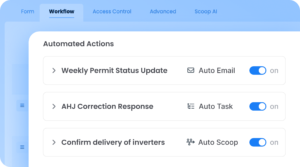
Automated follow-up prevents silence from becoming a project state. When an action happens, the system can immediately schedule the next check. That way, waiting remains active work rather than disappearing from view.
4. Make Documentation Part of the Work
Photos, forms, inspection records, customer documents, commissioning evidence, and completion records often get treated as things that accompany the work.
Operationally, they are part of the work. If a document is required for approval, billing, warranty protection, closeout, or future service, the project should not depend on someone remembering to attach it later.
The requirement should be built into the process. That helps teams capture the right information while the work is happening, rather than trying to reconstruct it later.
5. Keep Customers and Stakeholders Updated Automatically
A large amount of operational time is consumed by routine updates. Teams are constantly checking:
- Has the survey been reviewed?
- Did the project move to design?
- Was the permit approved?
- Is the crew scheduled?
- Has the inspection happened?
These updates matter, but writing each one manually is rarely the best use of an operations team’s time.
Automated communications can be triggered as a project reaches defined milestones. That can keep customers, internal teams, subcontractors, or other stakeholders informed without requiring someone to stop and send every update by hand. Consistent communication also reduces the inbound “just checking in” messages that create even more work.
6. Build Approvals Into the Project Flow
A process is only standardized if the project cannot quietly bypass the standard.
Consider an approval that everyone knows is required. If the project can still advance without it, the approval is really a suggestion. The same applies to required documents, inspection results, quality checks, signatures, or financial conditions.
Automated stage requirements can prevent work from progressing until those conditions are met. The workflow becomes the operating standard, rather than relying on every person to remember the same rules.
7. Escalate Exceptions Before They Become Delays
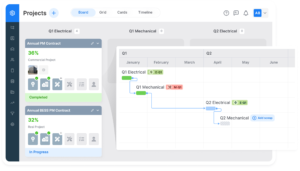
Not every project will follow the same happy path. In these instances, the goal is to make sure they become visible quickly. If an inspection fails, a required submission is rejected, a document is incomplete, a deadline is missed, or a project sits too long in one stage, these events should create action automatically.
That might mean assigning a task, notifying an owner, recording the reason for the exception, or starting a new workflow. The important point is that the system identifies the exception while there is still time to act.
8. Automate Handoffs Between Teams
The lifecycle of a project is full of handoffs. Those handoffs are often where projects slow down because each transition requires someone to notice that the previous step is complete.
Automation can remove that dependency. When the required work is complete, the next stage can be triggered, assigned, and communicated automatically. The workflow keeps moving without someone manually pushing it forward.
9. Keep Project Progress Visible
Useful visibility tells you where work is slowing down and why. Operations teams should be able to easily find out:
- Which projects are waiting on review?
- Which approvals are overdue?
- Where are cycle times increasing?
- Which teams are carrying the biggest backlog?
- Which project stage is creating the biggest bottleneck?
As operations become more complex, this kind of visibility becomes increasingly important because leadership cannot solve what the organization cannot see. The goal is to make project status a property of the workflow rather than something someone has to investigate.
10. Make Closeout Complete Before Attention Moves On
Closeout is one of the easiest places for work to become incomplete. By the time a project reaches the end, everyone has already turned their attention to the next one, but missing closeout information tends to become expensive later. If the project record was never fully completed, the organization is forced to reconstruct the past.
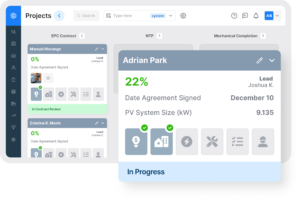
A structured closeout process can require the final approvals, records, documentation, and communications before the project is considered complete. That turns closeout from an administrative afterthought into part of the operating model.
The Ultimate Opportunity: Systematize Project Knowledge
The point of these automations is not simply to make individual tasks faster. The bigger opportunity is to change what experienced people spend their time doing. In many organizations, one or two people effectively become the unofficial operating system. They know which projects need attention, which team needs a follow-up, how each jurisdiction works, what information is missing, and who needs to act next.
That knowledge is incredibly valuable, but remembering every operational detail is not the highest-value use of that expertise. The goal should be to take the repeatable parts of that knowledge and build them into the operating process itself. That way, your strongest people can focus more on judgment, problem solving, optimization, and growth instead of acting as a human reminder system.
It also makes the operation much easier to scale. New employees do not need to absorb months of tribal knowledge before they can work independently. New regions do not require teams to recreate the operating model from scratch, and new teams do not have to memorize how every project moves. The process becomes easier to follow because the expectations are built into the way the work runs.
What This Means for Growing Project and Field Operations Teams
For companies managing installations, service work, construction, infrastructure deployments, maintenance programs, or other complex field operations, growth introduces much more than additional project volume. It also means more people, handoffs, systems, regions, exceptions, and opportunities for ownership to become unclear.
That is why operational scalability is not simply a matter of buying another application. The real challenge is creating a consistent operating model across the applications, teams, and people already involved in the work.
Scoop helps companies do that by putting steps, requirements, approvals, communications, and handoffs into shared workflows while connecting with the systems that already support the business. The result is a clearer, more repeatable way to run complex work without forcing every team into the same monolithic system.
To learn more about how Scoop’s automations can help your team enhance your operating model, access the webinar here, or schedule a 20-minute demo with our team.